


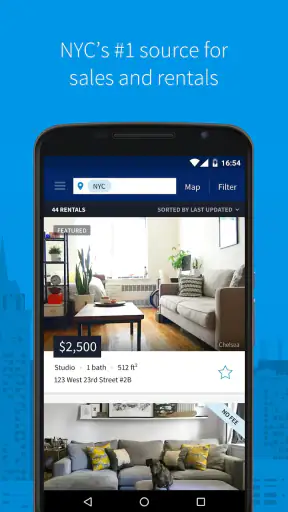
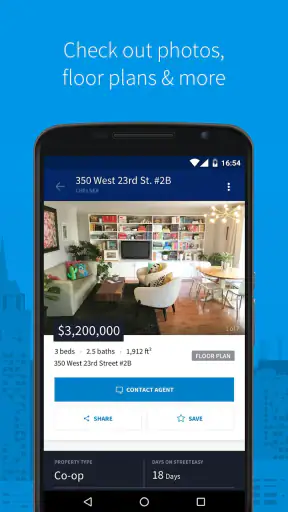
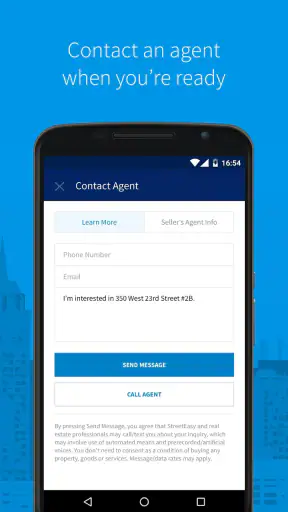
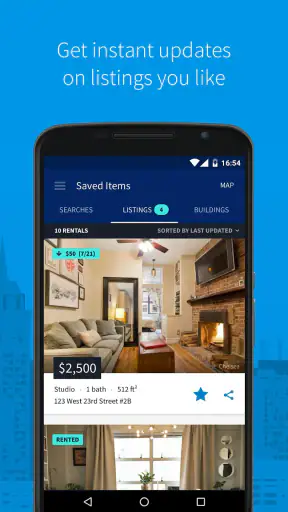
Finding a home in New York City can feel like a second job, especially when you are comparing neighborhoods, prices, apartment sizes, and travel times all at once. I found that StreetEasy - Apartments in NYC is most useful when I treat it as a focused search workspace rather than a magic shortcut. It brings rental and for-sale listings into one place, helping me turn a vague idea such as “somewhere near downtown” into a shortlist I can actually investigate.
This is a free House & Home app from StreetEasy, Inc., aimed at people searching specifically within New York City. It is available for Everyone, and its broad reach is reflected in more than a million installs. The current version is 3.121.0, while the app itself has been around since September 29, 2014. Those details matter less than the practical point: this is an established NYC property-search tool, not a general real-estate app trying to cover every city.
What to expect when you open the NYC apartment search
The first thing I would tell a new user is to narrow the search early. A large apartment database can be helpful, but it can also produce a tiring stream of possibilities if you leave every option open. I get better results by deciding which matters most before browsing: a particular neighborhood, a maximum monthly budget, a minimum number of bedrooms, or a short commute to a regular destination.
The app works best for renters and buyers who already know they want to look in New York City. If you are still comparing cities, researching suburban areas, or hoping to browse a national inventory, this is not the right starting point. Its strength comes from concentration. Instead of spreading attention across many markets, it keeps the search centered on NYC apartments for rent and for sale.
I also like separating “interesting” from “realistic.” A listing may look attractive because of photos, a convenient location, or a tempting price, but it still has to fit the rest of your life. I use the app to build a first shortlist, then examine each candidate with a more skeptical eye. That habit prevents the common mistake of treating the first appealing result as the answer.
The store shows an average rating of 3.2 from around 5,200 ratings and roughly 1,400 written reviews. I read that as a reason to keep expectations practical. The app can make discovery much easier, but a property search still depends on listing quality, timing, and details that need checking before you make a decision.
Who gets the most value from it
StreetEasy is a strong fit for someone moving to New York, changing neighborhoods, looking for a first apartment, or comparing a rental with a possible purchase. It is particularly useful when you need to explore several parts of the city without opening a separate search for every area. A person who already has a rough budget and a few preferred neighborhoods can reach a meaningful shortlist quickly.
I would be more cautious recommending it to someone who wants a casual property browser with no commitment to NYC. The focused inventory is an advantage for local searching, but it becomes a limitation outside that purpose. I would also avoid relying on it alone if your search has unusual requirements, such as a very specific building feature or a complicated move-in situation. In those cases, the app is a starting point, not the entire research process.
How it differs from the usual alternatives
Compared with a general web search, the app gives me a more direct route to apartment discovery. A normal search engine often mixes property pages with guides, old results, advertisements, and unrelated neighborhood content. StreetEasy keeps the attention on homes, which makes repeated comparison less distracting.
Compared with broad real-estate marketplaces, its trade-off is geographic focus. A large national service may be better if you are comparing New York with another state or if your move is still undecided. StreetEasy makes more sense after NYC has become the serious option. I would use a broad marketplace for the first stage of a multi-city move, then switch to this app when I needed a more concentrated look at New York apartments.
It also should not replace direct verification. No property-search app can make photographs, descriptions, availability, or neighborhood impressions a substitute for checking the actual details. I use the app to decide which listings deserve time, not to skip the questions that come before an application, viewing, offer, or purchase discussion.
From first setup to a useful shortlist
Start with a question, not endless scrolling
After installing the app, I recommend beginning with one clear question: “What kind of NYC home am I trying to find right now?” That might be a rental for an upcoming move, a purchase for a longer-term plan, or simply a neighborhood comparison. The answer determines how strict your filters should be and keeps the first session from becoming an unstructured tour of attractive but unsuitable apartments.
I would then choose the broadest location that still feels meaningful. If you already know a neighborhood, start there. If you only know a part of the city, begin with that area and compare nearby possibilities later. Starting too broadly can hide the differences that matter, while starting too narrowly can make you believe there are no suitable options when the real answer is just one neighborhood away.
Next, set the financial boundary you can genuinely live with. I prefer using a comfortable ceiling rather than the absolute maximum I could theoretically stretch to. That leaves room for the practical costs that come with moving and living in the city. The app can help surface candidates, but it cannot decide what level of monthly commitment is healthy for your own situation.
Use filters as decision tools
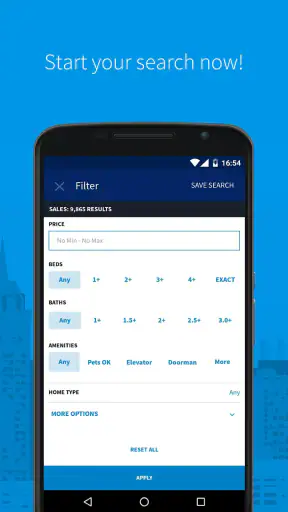
Filters are most valuable when each one has a purpose. A bedroom requirement can remove homes that would never work. A location choice can keep travel time manageable. A price limit can protect you from falling in love with a place that was never affordable. I avoid adding every possible condition at the beginning because overly strict searches can eliminate apartments that might have worked with one small compromise.
My preferred workflow is staged. First, I make a practical search with only the requirements I will not change. Then I review the results and notice patterns: perhaps a nearby area offers better space, or a certain apartment type appears more often than expected. Only after that do I add softer preferences. This gives me a useful picture of the market instead of a tiny result set shaped by assumptions.
One non-obvious benefit of this approach is that it exposes trade-offs early. If the preferred neighborhood produces very few suitable homes, I can decide whether to adjust location, size, or budget before spending time on individual listings. That is more useful than scrolling through a large collection without understanding why the results look the way they do.
The first meaningful success
For me, the first successful action is not installing the app or opening a listing. It is creating a shortlist of homes that each pass the same basic test. I look for a plausible location, a workable price, a suitable home type, and enough information to justify further attention. Once I have several candidates, the search becomes a comparison exercise rather than a hunt for one perfect result.
A realistic example would be a renter moving to NYC for a new job. On the first evening, I would choose the neighborhoods that make the commute reasonable, apply a budget I can sustain, and set the minimum home size I actually need. I would then save or note the strongest candidates, revisit them later, and compare the compromises. One apartment might be closer to work, another might offer more space, and a third might make the budget easier. The app helps organize that first decision, even though the final choice requires more checking.
I suggest recording why each listing made the shortlist. A simple note such as “best location,” “most space,” or “lowest acceptable cost” is surprisingly useful. Without that explanation, several apartments can blur together after a long session. The note also makes it easier to remove a candidate when its main advantage no longer matters.
Look beyond the attractive first impression
Photos are useful for deciding whether a listing deserves attention, but I never let them settle the question. I read the description carefully, check the location in relation to my daily routine, and look for details that could change the practical value of the home. A beautiful room in the wrong part of the city may be less useful than a plain room that makes every weekday easier.
Another tip is to compare listings by the same criteria rather than by mood. I ask myself whether each one meets the same size, location, and affordability standards. This reduces the influence of polished photography or an unusually appealing first image. It also makes the app more useful for buyers, because a purchase search can otherwise become dominated by emotion very quickly.
Common confusion during apartment research
The biggest source of confusion is treating the app as if every result has the same level of certainty. I see it as a discovery layer. A listing gives me a reason to investigate, but I still need to pay attention to its wording, current relevance, and the questions it leaves open. That mindset is especially important in a fast-moving city where a home can become unavailable or change before I am ready to act.
Another common mistake is mixing rental and purchase thinking. The app covers both, but the way I evaluate them is different. For a rental, I focus on monthly affordability, location, and immediate suitability. For a purchase, I think more carefully about the building, the neighborhood over time, and whether the home fits a longer plan. Using the same casual browsing style for both can lead to poor comparisons.
I also avoid assuming that a map position tells me everything about daily life. Two places may appear close but feel very different once I consider the actual route, errands, noise, and the rhythm of the surrounding area. The app is helpful for narrowing geography, but I still want to investigate the neighborhood separately before committing to a viewing or serious conversation.
When the search feels too narrow or too broad
If the results are overwhelming, I tighten one important condition at a time. I might reduce the area, clarify the home size, or lower the maximum price. Changing several filters together makes it difficult to understand what caused the result to improve. A gradual approach teaches me which compromise has the greatest effect.
If the results are nearly empty, I loosen the least important preference first. I would rather reconsider a preferred neighborhood or an optional feature than immediately abandon the entire search. This is one of the app’s best uses for first-time movers: it turns a general feeling of “nothing is available” into a more specific question about which requirement is blocking progress.
There is also a useful difference between a search that is narrow by design and one that is narrow by accident. A carefully focused search reflects real priorities. An accidental narrow search usually comes from adding every preference before learning what the market offers. I try to identify which situation I am in before making a major decision.
What to do after building the shortlist
Once I have a shortlist, I stop browsing for a moment and begin verification. I compare the candidates side by side, revisit their descriptions, and write down questions. For a rental, I might want to clarify availability, included items, move-in timing, and any condition that affects affordability. For a purchase, my questions would be broader and more cautious because the decision carries longer consequences.
I also use the shortlist to plan efficient follow-up. Instead of contacting or investigating every result, I rank the homes by how well they balance my non-negotiables and compromises. The best candidate is not always the most visually impressive one; it is often the listing that solves the largest number of daily problems without creating a new financial or logistical one.
This is where the app’s focused database becomes genuinely practical. It reduces the time spent finding possibilities, leaving more attention for the work that cannot be automated: checking details, arranging a viewing, understanding the neighborhood, and deciding whether the home fits real life. That division of labor feels sensible to me.
Performance, access, and everyday practicality
The app is free, which makes it easy to try before deciding whether it fits your search habits. It supports devices running Android 8.0 or later, and the Everyone age rating makes it broadly accessible to households searching together. I appreciate that a first-time user can begin without treating the app as a paid commitment.
Still, free access does not remove the need for patience. Apartment hunting is repetitive, and the value comes from returning to the search with better criteria rather than expecting one session to solve everything. I would use it in short sessions: one for setting the search, another for reviewing candidates, and later sessions for checking whether the shortlist still deserves attention.
The public rating of 3.2 suggests that the experience will not be perfect for everyone. In my view, that is consistent with the app’s role. Search tools can be extremely useful while still frustrating users who expect every listing to be current, every detail to be complete, or every search result to match a complicated set of preferences. I judge it by how much it improves my research process, not by whether it eliminates the uncertainty of moving.
Who should skip it
I would skip StreetEasy if New York City is not part of my realistic plan. Its specialization is the reason to choose it, and outside that context the focus has little value. I would also look elsewhere first if I needed a broad comparison across many cities or countries.
I would not make it my only tool if my search depended on highly specialized housing requirements. In that situation, I would use it to learn what is available, then add direct conversations and targeted research. Likewise, anyone who dislikes comparing listings, checking descriptions, and following up independently may find the app less satisfying than expected. It organizes discovery; it does not make the decision for you.
My final recommendation for a first-time user
I recommend StreetEasy to anyone seriously exploring apartments in New York City, especially if this is the first time you are navigating the city’s housing market. Begin with a clear purpose, choose only the filters that reflect true requirements, and aim for a shortlist rather than endless browsing. That path makes the app feel calmer and more useful.
My strongest advice is to treat every promising listing as a question: could this work for my budget, routine, timing, and expectations? The app is excellent at helping me find those questions quickly, and it is much less useful when I expect it to provide the final answer without further checking.
StreetEasy, Inc. has built a focused tool for a very specific search, and that focus is its main advantage. With an average rating of 3.2 and more than a million installs, it has clearly reached a substantial audience, but I would still approach it as a practical aid rather than a complete moving service. For the right user, it can turn a confusing NYC apartment hunt into an organized sequence: define the need, narrow the area, compare realistic homes, and investigate the strongest candidates.


